Access Phone Numbers are a set of phone numbers
around the world where people can ring in from phone or
computer to access Net2MAX
services without having to pay long distance charges.
Using Access Phone Numbers
1. People contacting you
Access Phone Numbers can be used by people to make voice calls
from Normal or Internet phones around the world to you without having
to pay long distance charges for those calls.
They just ring the Access Phone Number in their
local area and then enter your phone number when prompted. Your
predefined phone number will be contacted.
Have a look at www.138813.com
for how to use the Access Phone Numbers in Australia.
2. You accessing Net2MAX
Access Phone Numbers can be used by you to access Net2MAX from
Normal or Internet phones around the world without having to pay
long distance charges for those calls.
You just ring the Access Phone Number in your local
area and then enter the Net2MAX function you want to use.
Types of Access Phone Numbers
There are four types of Access Phone Numbers:
(1) City access phone number for each different city
(2) National access phone number for each different nation
(3) International access phone number worldwide
(4) Internet access phone number on the Internet
Net2MAX is offering Access Phone Numbers in an increasing
number of locations around the world. Access Phone Number is
a very cost effective and fast way of gaining global presence
by allowing people ring to you or you ring Net2MAX for the cost
of a local call.
City Access Numbers
A City Access Phone Number is a local phone number in the caller's
city or town. They can call it like any local number in their city
without paying long distance charges.
Callers simply ring well published Net2MAX Access
Phone Numbers in their local cities and then enter your phone
number to get in touch with you. Which means your callers
gain local call access to you in ALL cities that Net2MAX have
City Access Phone Numbers.
For example, if the caller is in
Sydney, she will be dialing a Sydney Local Access Number for the cost
of a local calls (in places like Hong Kong a local call is free).
Currently available City Access Phone Numbers
are:
(+618) 8122 0050 Adelaide
(+612) 6000 1010 Albury
(+618) 8902 1020 Alice Springs
(+612) 6700 8000 Armidale
(+613) 5300 1010 Ballarat
(+612) 6301 4350 Bathurst
(+612) 6400 7000 Bega
(+613) 5400 1010 Bendigo
(+617) 3107 1210 Brisbane
(+618) 8001 1010 Broken Hill
(+618) 9100 4010 Broome
(+618) 9702 1010 Bunbury
(+617) 4100 1010 Bundaberg
(+617) 4000 8350 Cairns
(+612) 4600 4010 Campbelltown
(+612) 6101 0030 Canberra
(+612) 6601 8210 Coffs Harbour
(+618) 8900 8320 Darwin
(+612) 6800 3000 Dubbo
(+618) 8504 7000 Gawler
(+613) 5200 1230 Geelong
(+618) 9904 7010 Geraldton
(+613) 5300 4000 Gisborne
(+617) 4900 6000 Gladstone
(+612) 4300 1210 Gosford
(+612) 4803 4000 Goulburn
(+612) 6605 3020 Grafton
(+612) 6904 3000 Griffith
(+613) 6200 8350 Hobart
(+618) 9009 4350 Kalgoorlie
(+618) 9103 3000 Karratha
(+618) 9814 1000 Katanning
(+617) 5402 6000 Kawana Waters
(+613) 6300 1360 Launceston
(+612) 6607 1000 Lismore
(+617) 4900 4010 Mackay
(+617) 5400 1040 Maroochydore
(+617) 4100 4000 Maryborough
(+613) 9912 0320 Melbourne
(+613) 5008 4010 Mildura
(+613) 5110 7000 Morwell
(+618) 8707 7350 Mount Gambier
(+617) 4713 6010 Mt Isa
(+618) 8513 3000 Murray Bridge
(+612) 4906 0070 Newcastle
(+612) 4402 7010 Nowra
(+612) 6318 7010 Orange
(+612) 4701 4010 Penrith
(+618) 6260 0220 Perth
(+618) 8618 4000 Port Augusta
(+612) 6500 1020 Port Macquarie
(+612) 4501 1010 Richmond
(+617) 4900 0010 Rockhampton
(+618) 9500 0020 Rockingham
(+613) 5800 1020 Shepparton
(+617) 5511 8060 Southport
(+612) 9007 8410 Sydney
(+612) 6502 0010 Tamworth
(+612) 6500 4020 Taree
(+617) 4600 0010 Toowoomba
(+617) 4700 0020 Townsville
(+612) 6900 1010 Wagga Wagga
(+613) 5713 6000 Wangaratta
(+613) 5604 6000 Warragul
(+613) 5516 7000 Warrnambool
(+612) 4200 8360 Wollongong
National Access Phone Numbers
A special feature of Net2MAX Access Phone Numbers is the
availability of National Access Phone numbers as well as City
based Access Phone Numbers.
To have wide geographical coverage, it is inconvenient to
give out a large number of different City Access Phone
Numbers in different cities. With National Access Phone
Numbers you can give out Access numbers for whole countries
instead of individual cities.
There is a single phone number across the whole nation (rather than
per city) so the National Access Phone Numbers are much easier to remember
and give out to people.
For example, in Australia, people simply need to ring the
Australian National Access number 138813 and enter your phone
number. They will then be able to talk to you with the cost
of a local call - wherever they are in Australia.
A National Access Phone Number can result in substantial
costs savings. In Australia 138813 is available for people to
contact you toll-free at a tiny fraction of what you will pay
with a standard 1300 or 13 number.
Currently available National Access Phone Numbers
are:
National Phone Numbers are easy to remember number for the whole country, for
long calls (more than 15 minutes) it is more economical to give out individual
City Access Phone Numbers for each city - which give local call rate to phones
ringing in from that city.
International Access Phone Number
Net2MAX has a single International Access Phone Numbers to
give callers ONE Access Phone Number across MULTIPLE
countries.
The single International Access number is +800
4455 1234.
Using International Access number is the same as using any
Access Phone Numbers. The callers simply ring in and then
enter your phone number to get in touch with you.
The + in the +800 4455 1234 number means that the caller
has to enter the IDD prefix of their telephone company before
entering 800 4455 1234. The IDD prefix is not optional and must be entered.
However, the caller will NOT be charged any
IDD or long distance fee. The call will either be completely free or
toll-free (only local call fee).
The International Access Number is very useful for short calls and
for ringing in to find out the City Access Phone Number or National
Access Phone Number of your local area when you are overseas.
Internet Access Phone Number
People with Internet-connected computers can call you worldwide
without paying a cent. You can give callers worldwide FREE
voice access to you through their Internet-connected computers.
You can of course use the same Internet Access Phone Numbers yourself to
access Net2MAX for free.
There two types of Internet Access Phone Numbers, the Web Button
and the Internet Phone.
Internet Phone
There are an increasing number of Internet Phone hardware and
software deployed around the world. Most of those users can contact
you from their Internet Phones for free.
Access Phone Number currently supports the SIP protocol as standard,
with optional H323 and IAX support.
For those without Internet Phone, free Internet Phone software can be
downloaded from the Internet which gives caller a phone
look-alike dial-pad interface on their computer. They just enter your
phone number on the dial-pad to make a call to you.
Web Buttom
It is not always convenient to have to install Internet Phone software
on computers into order to call you (say whe the caller is in a public
Internet cafe). In those cases the Web Button will be useful.
People surfing the Internet from anywhere in the world can go to a
web page click on the Web Button there and enter your phone
number. They are then
connected to your predefined phone number. Suddenly people with Internet
connection around the world can call your phone for free using their
computers from a web page without need of installing .
Intelligent Backend
All Access Phone Numbers (City, National, International or
Internet)
have the same intelligent backend that handles all incoming
calls. Once the callers ring in, they will be asked to enter
a phone number. If the phone number is 899 followed by your
OZnumber then they will be transferred to your Internet
Phone. If the phone number is 898 followed by your OZnumber
then they will be transferred to your Web PABX.
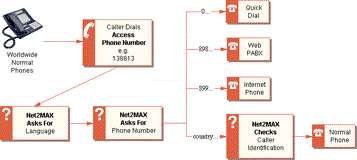
The intelliegnt backend supports the entering of standard
IDD phone numbers (beginning with full country code and area
code) in order to make calls to Normal Phone numbers. For
example, entering 61292176000 will ring a Sydney phone numebr
while 85223120180 will ring a Hong Kong phopne number. But in
this case, Net2MAX will ask for Caller Identification (ask
for OZnumber and PIN) so it can charge the outgoing call to
the caller.
Trusted Phone Numbers
You can define trusted incoming phone numbers so when the
Access Phone Number receives calls from these trusted phone
numbers then it will by-pass the standard identification
processes.
You can optionally select from the web which Access Phone
Number identification process to by-pass. Currently, trusted
phones can by-pass the identification processes in two
instances:
- Phone Number By-Pass for Web PABX will allow callers
from the trusted phone numbers you have defined to go
straight to your Web PABX, without Net2MAX having to ask
them for a phone number (like 898...).
So, if they ring the Access Phone Number in Australia
(138813) they will NOT get Net2MAX asking them to enter
another phone number - they will be transferred to your
Web PABX directly.
- Caller Identification By-Pass for Dial Out will allow
callers from the trusted phone numbers you have defined
to make calls to Normal phone numbers, without Net2MAX
having to ask them for login (supply OZnumber and PIN).
So, if they ring the Access Phone Number in Australia
(138813) they will still get Net2MAX asking them to enter
a phone number - but if they do enter a Normal Phone
number (like 61292176000 or 85223120180) then they will
be transferred to the phone number directly - no login
required.
Self Selection
A major advantage of Net2MAX is your ability to pick your
own phone number. You can make it the same as your normal
phone number (mobile or landline) or any other easy to
remember or well known number.
The phone number your callers need to enter after dialing
into the Access Phone Numbers is simply your OZnumber with
either 898 or 899 and your Area Code added in front. Say your
Area Code is 060 and your OZnumber is 12345 then your phone
numbers are 89806012345 (for your Web PABX) and 89906012345
(for your Internet Phone).
The Area Code is OPTIONAL in your home country (which has
a single Net2MAX Area Code) so if you belong to the Australia
Net2MAX Area (060), then people there just can dial the
Australian Access Phone Number 138813 and then just enter
89812345 rather than 89806012345 to reach you.
Charges
- Receiving calls made by others to you using ANY phone
via City Access Numbers (within Australia)
9c per call
No cut-off
- Receiving calls made by others using LANDLINE phone to
you via National Access Numbers (within Australia)
9c per call
With 15 minutes cut-off
- Receiving calls made by others using MOBILE phone to
you via National Access Numbers (within Australia)
$1 per call
With 15 minutes cut-off
- Receiving calls made by others using ANY phone to you
via International Access Numbers
$5 per call
With 15 minutes cut-off
Note all prices subject to change, please refer to Usage
Terms and Conditions
Usage Notes
- When calling Normal Phones, you can defined Trusted
Phone numbers from your Access Phone Number page, so
Net2MAX does not have to prompt you to enter your
OZnumber and OZsignature explicitly - saving some time
when calling Normal Phones.
- Calls to 898... and 899... requires NO caller
identification, so you can give the 138813 to anyone and
they can call your Web PABX or Internet Phone using
138813.
User Guide
The following steps are the simple way to set up a Access
Phone Number:
Step 1: Login to http://www.oztralia.com/index1.php
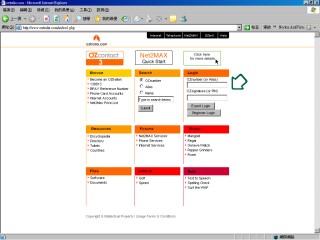
Step 2: Click on Managers -> Phone
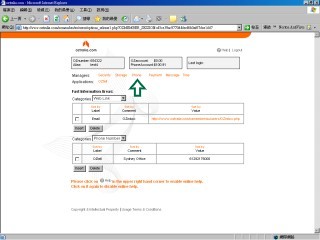
Step 3: Click on Access Phone Number
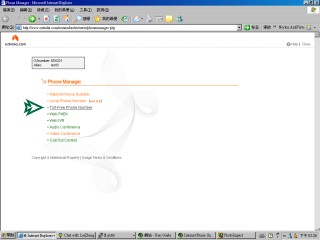
Step 4: Register Access Phone Number service
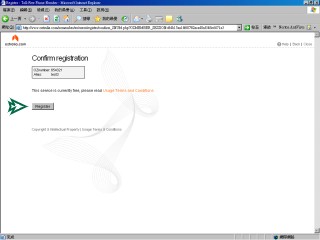
Step 5: Finished register then close the page and click on
Access Phone Number again under Phone Manager to enter into
Access Phone Number main menu
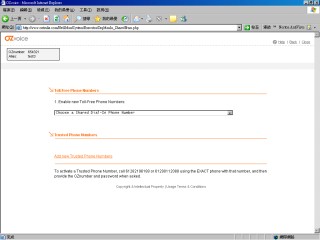
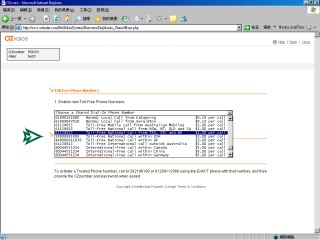
Step 6: Select a shared phone number from the list and
click OK
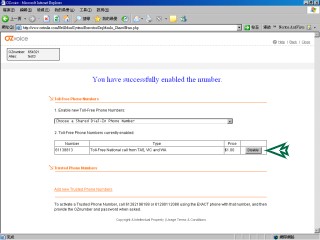
Step 7: Click on Disable to disable the shared phone
number
Step 8: Trusted Phone Numbers is used for access to the
Access Phone Number service without the enter of OZnumber and
Password. Use the Caller ID to identify the OZmember
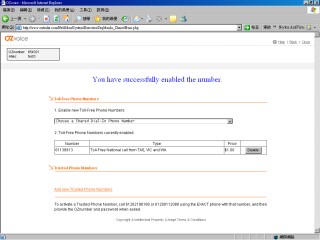
Step 9: Click on "Add new Trusted Phone Numbers" to add
trusted phone number
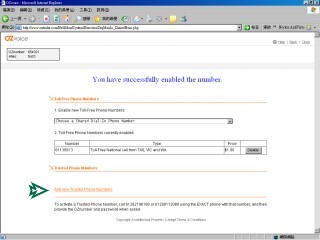
Step 10: Enter your international phone number including
country code and area code and click Submit and OK
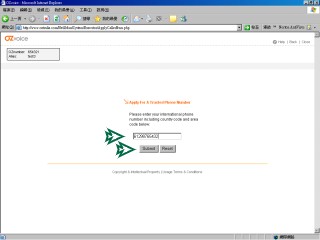
Step 11: Currently the Trusted Phone Number is inactive,
to activate a Trusted Phone Number, call 61282196188 or
61290112088 using the EXACT phone with that number, and then
provide the OZnumber and password when asked
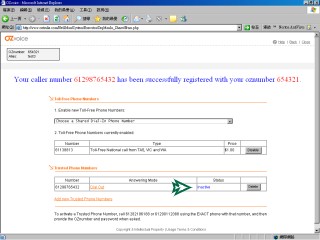
Step 12: Click on Dial Out to select the new service that
you want to apply for the trusted phone number (Dial Out, Web
PABX)
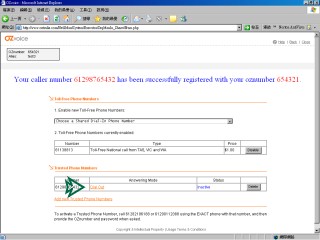
Step 13: Select the service and click OK
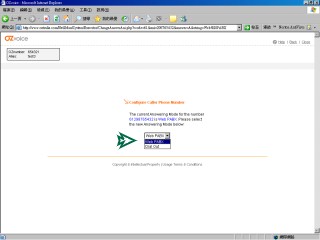
Step 14: Finish setting then click the close button to
close the page
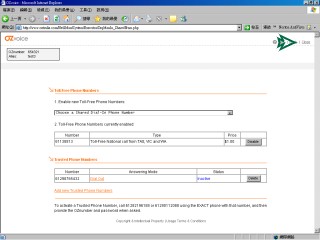
| 





