 |
Purchase more OZaccount Credits
This is for purchase of OZaccount Credits using Credit Card or
Direct Account Debit only.
CLICK HERE for alternative ways of purchasing OZaccount Credits.

The Bank Account List specifies the bank accounts used for purchase
of OZaccount Credits.
Charge Priority allows the use of multiple credit cards.
This is handy when one credit card runs out of credit or is expired.
You can specify the order in which your want OZaccount to charge
the different credit cards of yours. Whenever you want to make a
payment, OZaccount will automatically try one credit card after
the other, in the order of the lowest or smallest number in the
Charge Priority FIRST. So, if you have three credit cards and your
have Charge Priority of 1, 2, 3 for them respectively, then the
credit card with Charge Priority of 1 will be used first, if that
fails then the credit card with Charge priority of 2 will be used
and if that fails, the credit card with Charge Priority of 3 will
be used.
Account Type should be set to Credit Card.
Although both Credit Card and Direct Account Debt types are supported,
special approval is needed to use Direct Account Debt, so unless
you have written instructions from us, you should select Credit
Card here (Do NOT select Direct Account Debit).
Account Number is your Credit Card Number.
Enter your full Credit Card number here. For easy entry, either
spaces or no spaces between the digits are OK. OZaccount will convert
them to without space for storage.
Account Expiry is the Expiry Date on your Credit Card.
Just click the down arrows to select the correct month and correct
year.
Check Digits on your credit card
Most Credit Cards now have a verification number or security code
printed on them. This makes it harder for people to use your card
for online purchase like this one. For Visa and Mastercard it is
a 3-digit number printed on the back.
Account Name on the Credit Card.
Entry the full name of the credit card holder here.
Charge Limit given to this particular Credit Card.
This is the current charge limit that OZtell gives to your credit
card. OZtell may automatically adjust your charge limit for that
Credit Card or you may apply for a higher charge limit for that
credit card with OZtell. You can charge up to this "Charge
Limit" within the past "Time Limit" number of days.
Time Limit on the Charge Limit.
The "Charge Limit" defined above will apply for the period
defined by "Time Limit". So, if it is $60 and 10 days.
That means you can use this credit card to purchase a total of up
to $60 worth of OZaccount Credit within the past 10 days (including
today).
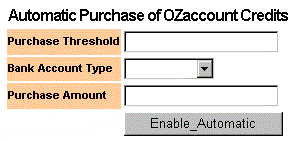
Automatic Purchase of OZaccount Credits instructs the system to
monitor the amount of credits left in OZaccount and when that amount
drops below a predefined Purchase Threshold then the system will
automatically purchase more OZaccount Credits using the Bank Account
List defined above.
Purchase Threshold is the value that the amount of OZaccount Credits
is constantly compared with. An automatic purchase action will occur
if the OZaccount Credits fall BELOW the Purchase Thresholds.
Bank Account Type should be set to Credit Card (unless you have
special written permission from us to select Direct Account Debit).
Purchase Amount is how much OZaccount Credits to purchase when the
credits drops below the Purchase Threshold. If the value of the
Amount field is 0 (Zero) then it means automatically purchase the
difference between the Purchase Threshold and the OZaccount Credits.
That is the system will top up your OZaccount Credit to the same
level of that of the Purchase Threshold.
-
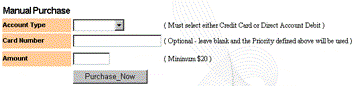
Once the list is defined you can then initiate a purchase of
OZaccount Credits using the list via the web, phone or SMS.
1- From the Web, simply go to the Manual Purchase under the
"Purhase more Credit" :
2- From the Phone, simply ring OZtell up during office hours.
Note that the Payment Source rules you set up on the web above
will apply to your phone transactions as well.
3- From the SMS, send an SMS to 0410311070 with the (E91111)
-
Only Visa, Master and Bankcard are supported at this stage.
-
The minimum purchase is AU$20.
-
You will get a reference number back from OZaccount, please
keep it as a record.
-
Credit will normally appear in your OZaccount within the next
BUSINESS DAY. On the same day, if you are lucky. But sometimes
it can be up to 2 business days later
Transfer OZaccount Credits to other Online Accounts
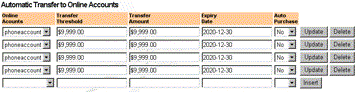
Online Accounts is a list of Online Accounts which accepts the
transfer of OZaccount credits to them as payment.
Transfer Threshold is the value that the balance of the Online Account
is constant compared with. An automatic transfer action will occur
if the Online Account balance falls BELOW the Transfer Threshold.
In other words, having a particular value in the Transfer Threshold
means that when the balance of the associated Online Account is
LESS than the Transfer Threshold value then the system will transfer
the amount that you already specified in the Transfer Amount from
your OZaccount Credit into the associated Online Account automatically.
If you don't have enough credit in your OZaccount then the system
will transfer whatever amount you have in your OZaccount.
Transfer Amount is the amount to be transfered when the associated
Online Account balance is less than the Transfer Threshold value.
If the Transfer Amount value is 0 (Zero) then system will transfer
the DIFFERENCE between your Online Account and Transfer Threshold.
So, the Transfer Amount is dynamic and will change depending on
the how much less is the Online Account balance than the Transfer
Threshold. In fact, it will equal that difference.
Expiry Date is the date when the Auto Transfer Rule will expire.
Auto Purchase mean if you would like to put your OZaccount in an
Auto Transfer mode which mean the system will topup your OZaccount
Balance automatically everytime your OZaccount Balance is less than
the Transfer Threshold value.
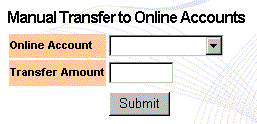
- Manual Transfer option mean that you can transfer manually
and straight away from your OZaccount Balance to any service that
you are already registered to with a condition that you have Credit
in your OZaccount Balance. All you have to do is to select the
service(Vendor) and the Amount that you want.
|








