|
Having an Internet Phone Number allows you to take advantage of
the next generation of phone technologies that give you much more
phone features at most lower costs than traditonal phone technologies.
Net2MAX's Internet Phone Numbers can be used on most Internet Phones
currently available (hardware or software). Please CLICK
HERE for more details on Internet Phones.
Self Selection
A major advantage of Net2MAX is your ability to pick your own phone
number. You can make it the same as your normal phone number (mobile
or landline) or any other easy to remember or well known number.
Your Internet Phone Number is simply your OZnumber with 899 and
your Area Code added in front. So, if your Area Code is 060 and
your OZnumber is 12345 then your Internet Phone Number is 89906012345.
You ability to select your OZnumber means you can also select your
own Internet Phone Number.
Just enter the Internet Phone Number (and some related dialing
information) into the Internet Phone of your choice and you can
make calls from your Internet Phone to other Internet Phones as
well as make calls to Normal Phones. You can also receive calls
from both Internet Phones and Normal Phones.
People calling you from the same area (say 060) can optionally
NOT put in the Area Code when calling you. So, they can enter just
89912345 rather than 89906012345 in order to ring your Internet
Phone.
Multiple Protocols
Another major advantage of Net2MAX is your ability to switch between
different Internet Phone protocols and codec dynamically (from the
web). Net2MAX offers the widest selection of Internet Phone protocols
of any Internet Phone network in the world, allowing you to communicate
with more people on different phone devices and networks.
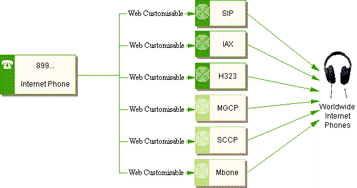
Currently supported Internet Phone protocols include SIP, H323
and IAX (Mbone, SCCP and MGCP are available on request). Currently
supported CODEC includes iLBC, GSM, G729, Speex, G726, H261 and
H263.
Charges
Set Up
There is NO set up charge for having an Internet Phone Number.
Monthly
There is NO monthly charge for having an Internet Phone Number.
Usage
For outgoing calls to:
- Landline and Mobiles.
Charge depends on destination, as listed on the web page:
http://www.oztell.com/telephone/pricelist/index.php
- Internet Phones (899...)
Calls to Internet Phones are free.
- Web PABX (898...)
Calls to Web PABX are normally free. Unless the Web PABX owner
set a rate for that number. But you will always get a warning
from the owner before entering those chargable Web PABX.
For incoming calls from:
- Landline and Mobiles via Local Phone Number
Calls from Local Phone Number to you are free.
- Landline and Mobiles via Shared Phone Number
Calls from Shared Phone Number to you have a charge:
http://ozforum.oztralia.com/index.php?show...findpost&p=3118
- Internet Phones (899...)
Calls from Internet Phones are free.
- Web PABX (898...)
Calls from Web PABX are free.
Note all prices subject to change, please refer to Usage
Terms and Conditions
User Guide
The following steps are the simple way to set up a Internet Phone
Number:
Step 1: Login to http://www.oztralia.com/index1.php
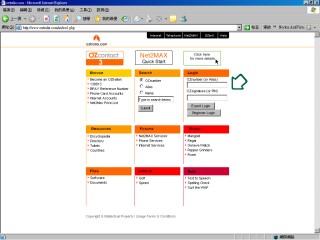
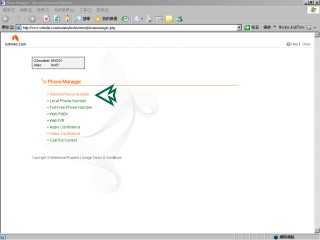
Step 2: Click on Managers -> Phone
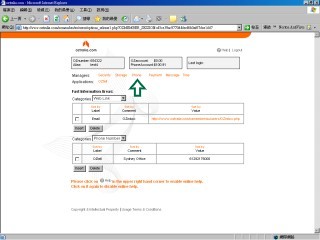
Step 3: Click on Internet Phone Number
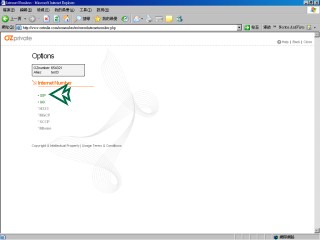
Step 4: Click on SIP
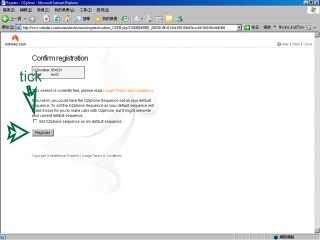
Step 5: Register SIP, you can check "Set OZphone sequence
as my default sequence" and this option is used for the Web
IVR service
Step 6: Finished register then close the page and click on SIP
again under Internet Phone Number to enter into SIP main menu
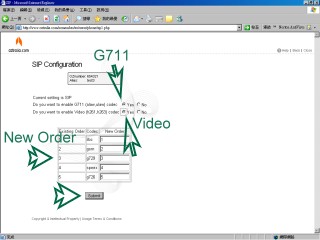
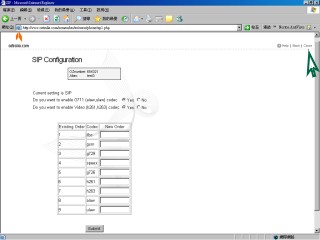
Step 7: You can enable the G711(alaw, ulaw) codec, enable video
support and re-arrange the new codec order and submit
Step 8: Finish setup, click close to close the page
Click here for more information on installing
Internet Phone Software (X-Lite)
|